
Screenshots
App details
- Updated
- Jun 19, 2008
- Language
- Spanish,English
- Developer
- Hewlett Packard
- Category
- Mobile
SoftPas in:
This product is also available in the following languages:
About LightScribe Simple Labeler
Download LightScribe Simple Labeler – CD DVD Labeling Tool, LightScribe Technology, Simple Disc Labeling, User-Friendly Interface
Overview
LightScribe Simple Labeler is a specialized mobile application designed to facilitate the quick and efficient creation of labels on CDs and DVDs using LightScribe technology. The app serves as a streamlined solution for users who require basic, professional-looking labels without the complexity of full-featured graphic design software. Its primary purpose is to allow users to add text and decorative borders directly onto optical discs through compatible burners, enabling a clean, permanent label that enhances organization and presentation.
Target users include individuals managing personal media collections, educators distributing digital content, and small business owners preparing promotional or archival discs. The app addresses the common challenge of inconsistent or poorly printed labels by offering a consistent, digital method of labeling that integrates directly with the disc-burning process. While it does not support advanced graphic design, it fills a niche for users who prioritize speed and simplicity over elaborate visuals.
Developed with a focus on usability, LightScribe Simple Labeler reflects an era when optical media were widely used for data storage and distribution. Although the developer did not provide additional background details, the app’s longevity—released in 2008—suggests a stable, well-tested tool for its intended purpose. In today’s digital ecosystem, it remains relevant for users maintaining legacy systems or working with physical media in educational, archival, or creative environments.
Key Features & Functionality
- User-Friendly Interface: The app features a clean, minimal layout designed for accessibility. Even users with no technical experience can navigate the interface to create labels quickly, reducing the learning curve associated with disc labeling tools.
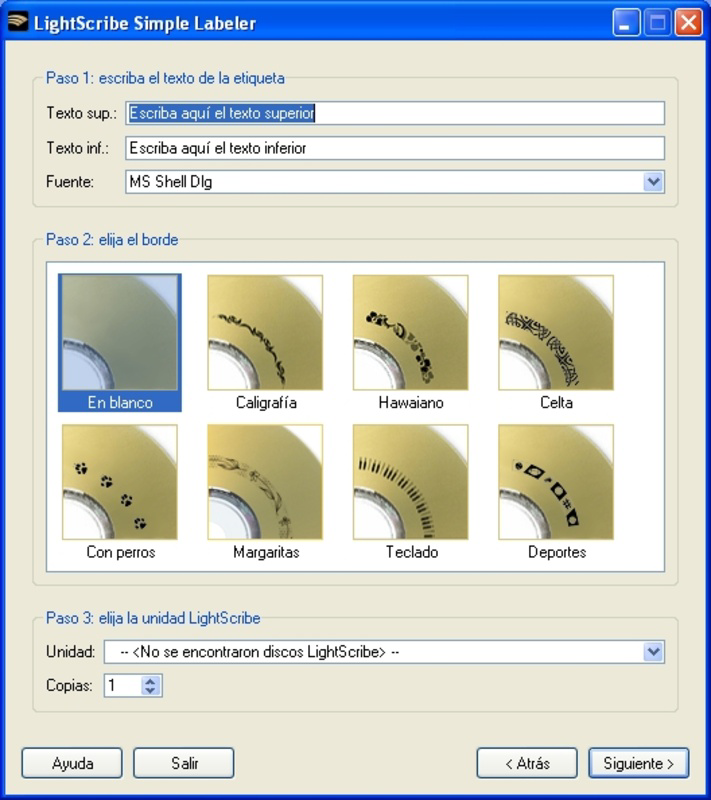
- Basic Label Creation: Users can input text in upper and lower regions of the disc surface, enabling clear labeling for titles, dates, or categories. This functionality supports efficient organization of media collections.
- Decorative Border Option: A simple border can be added around the label area, enhancing visual appeal without complicating the design process. This subtle feature improves the professional appearance of labeled discs.
- Font Customization: A selection of built-in fonts allows users to personalize their labels, ensuring readability and aesthetic consistency across multiple discs.
- LightScribe Technology Integration: The app requires a compatible LightScribe-enabled burner and disc to function. This ensures that labels are burned directly onto the disc surface using a laser, resulting in durable, smudge-free results.
For example, a music teacher could use the app to label student project CDs with names and dates in a consistent format. Similarly, a small business might use it to distribute client data on labeled discs for presentations. The app’s focus on speed and simplicity makes it ideal for repetitive labeling tasks where design flexibility is not a priority.
Interface, UX & Performance
The user interface of LightScribe Simple Labeler is designed with clarity and efficiency in mind. The layout emphasizes essential controls, minimizing visual clutter and enabling users to focus on label content. Navigation is linear and intuitive—users input text, select a font, choose a border, and proceed to burn the label with minimal steps.
Although the developer did not list formal performance metrics, the app’s lightweight nature suggests it runs smoothly on devices with moderate processing power and memory. It is likely optimized for stability during the labeling process, ensuring that label creation does not interrupt the disc-burning workflow. Responsiveness is expected to be consistent, as the app avoids complex animations or resource-heavy operations.
Compatibility with various device categories is not fully disclosed. However, given its release date and target functionality, it is most likely optimized for older Android or Windows-based systems. Users should expect stable operation during label generation, though performance may vary on newer platforms without native support. The app does not appear to include cloud sync, auto-save, or backup features, relying instead on local execution for label creation.
Platform Compatibility & Technical Requirements
LightScribe Simple Labeler is available for Android and iOS platforms. The specific operating system version requirements were not listed by the developer. Similarly, the file size and software version are not publicly disclosed.
Users must have a LightScribe-compatible optical drive and LightScribe-enabled discs to use the app effectively. Without these hardware components, the app’s core functionality cannot be accessed. The developer did not specify minimum OS requirements, so compatibility with modern devices is uncertain. It is recommended to verify hardware compatibility before attempting installation.
Pros and Cons
Pros
- Simple, intuitive interface suitable for non-technical users
- Quick label creation with minimal steps
- Supports text and border customization for basic design
- Uses durable, laser-burned labels via LightScribe technology
- Efficient for repetitive labeling tasks in educational or small business settings
Cons
- Requires LightScribe-compatible burner and discs—hardware dependency
- No advanced design tools or image support
- Developer did not provide OS version or file size details
- Not optimized for modern mobile devices without legacy support
- Functionality limited to basic text and border labeling
FAQ
Is LightScribe Simple Labeler free to download?
Yes, the app is available for free download. However, users must have compatible hardware to use its core features.
Do I need a specific type of CD or DVD to use this app?
Yes, you must use LightScribe-enabled discs, which are specially coated to accept laser-burned labels. Standard discs will not work with this application.
Can I use this app on modern smartphones?
Compatibility with modern smartphones is uncertain. The app was released in 2008 and may not support current operating systems. Users should verify hardware and software compatibility before installation.
Is the label permanent once burned?
Yes, labels created with LightScribe technology are permanent and resistant to smudging, fading, and wear, making them suitable for long-term archival use.
Does the app support image or logo embedding?
No, the app only supports text input and a basic border. It does not allow for image or logo integration.
Final Thoughts
LightScribe Simple Labeler remains a niche but functional tool for users who rely on optical media and require a fast, reliable method for labeling CDs and DVDs. Its minimalist design and straightforward workflow make it ideal for individuals seeking a no-frills solution for basic disc labeling. While it lacks modern features like image support or cloud integration, its core purpose is fulfilled with precision and ease.
For educators, archivists, and small teams managing physical media, the app offers a practical way to maintain organized, professional-looking disc collections. Its reliance on hardware compatibility is a limitation, but for those with access to LightScribe-enabled systems, it delivers consistent results without the overhead of complex software.
Download LightScribe Simple Labeler now
Guides & Tutorials
How to install LightScribe Simple Labeler
- Click the Download button above.
- Once redirected, accept the terms and click Install.
- Wait for the LightScribe Simple Labeler download to finish on your device.
How to use LightScribe Simple Labeler
This software is primarily used for its core features described above. Open the app after installation to explore its capabilities.
User Reviews
No reviews yet. Be the first to share your experience.
You may also like
more
Que no te pillen¡
About !Que no te pillen¡Reviewed by Jason A. BilbreyShow MoreShow Less

3D Combat Zone
About 3D Combat ZoneOriginally released in 1983, 3D Combat Zone immerses players...

666: El día del portal
About 666: El día del portalOn June 6, 2006, Agent P. Stone uncovers a sinister...

80 in 1 Best Flash games
About 80 in 1 Best Flash games 80 in 1 Best Flash games is a collection of 80 fl...

ABYSS SEEKERーーWhat Do You See Deep in The Abyss
About ABYSS SEEKERーーWhat Do You See Deep in The AbyssIn ABYSS SEEKER, players...

ACA NEOGEO THE KING OF FIGHTERS 2002 for Windows
About ACA NEOGEO THE KING OF FIGHTERS 2002 for WindowsTHE KING OF FIGHTERS 2002,...